The Story of Wave
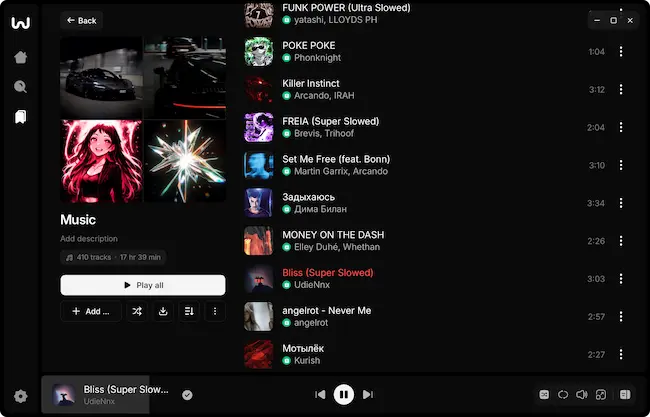
Spotify was asking me to get Premium even though I already had a subscription on my account. Offline mode sometimes failed. Other services had their own annoyances: getting logged out, account suspensions over suspected hacking, slow loading, and missing tracks. Meanwhile, subscriptions kept getting more expensive.
After another experience like that, I wanted to build an app for myself. Not because my own player would be bug-free, but because I could fix the bugs myself.
That became Wave. I now listen to music almost exclusively through it: on my MacBook, and on Android when I’m away from it. I don’t charge for the project, and I’ve published the client’s source code on GitHub. As far as I know, I’m still its only user.
The First Launch Wasn’t the End of the Work
I used AI during development. It helped me write code faster and try ideas I might not otherwise have found time for. But there was still plenty of work between getting the app to launch and having a player I could comfortably use every day.
I needed versions for MacBook and Android, music downloads, reasonable resource usage, and familiar playback controls. On desktop, that meant keyboard shortcuts and a compact player. On the phone, it meant background playback and notification controls.
A quick demo won’t reveal all of that. You notice memory growth after a long session, a missed tap after a swipe, and queue problems when a playlist ends. Those were the kinds of issues that kept sending me back to code I’d already written.
Why I Switched from Electron to Tauri
The first version of Wave ran on Electron. I later decided to move to Tauri: I wanted to reduce the app’s overhead and build the desktop and mobile versions on a shared foundation.
Electron ships the app with Chromium and Node.js. Tauri uses the system WebView for the interface and lets you write the native component in Rust. That meant I could keep the web interface while reworking the app shell and its interaction with the operating system.
The interface stayed on React and TypeScript. Rust is used in the client’s native component and in a separate server. On Android, there’s also Kotlin code for a background service, a notification with playback controls, and a media session. So calling this a complete rewrite in Rust wouldn’t be accurate.
A shared interface didn’t eliminate platform-specific work. On the phone, the app needs to handle losing audio focus and headphones being disconnected. On desktop, it needs global keyboard shortcuts and a separate compact-player window.
The CI setup builds versions for Windows, Linux, macOS on Intel and Apple Silicon, and Android. I regularly use the macOS and Android versions myself. The other platforms don’t get the same daily testing.
App Size and Memory Usage
On my MacBook, the app takes up about 6 MB. The Android installer is roughly 12 MB, and the installed app is around 14 MB. Downloaded music isn’t included in those figures.
The build doesn’t need to include a separate copy of Chromium, which keeps it small. But the system WebView still takes up space and consumes resources: installer size tells you nothing about RAM usage.
During normal use on my MacBook, I see around 100 MB across the related processes. Looking at just one process can give a lower figure. After roughly a month of use without restarting the app, memory usage had reached 500 MB.
During the migration, I reworked parts of the app and fixed memory leaks. I don’t have comparable measurements for the old and new versions, so I can’t separate the effect of Tauri from the other changes. The growth to 500 MB during extended use still needs investigating.
Where Wave Gets Its Music
Wave has a client and a separate server. The client requests catalog data and playback from the server, which works with YouTube Music.
The rustypipe library handles search and catalog data. The server first tries yt-dlp to get an audio stream URL, then streams the audio to the client. The code also includes a fallback for getting the URL through rustypipe.
The catalog and track availability still depend on YouTube Music. Having my own interface doesn’t remove that dependency: changes on the source’s side can affect Wave.
You can download tracks to listen offline. The client keeps downloads separate from its regular cache, so clearing the cache shouldn’t delete music you explicitly saved. Offline playback works with tracks that have already been downloaded; the player still needs the server for its other features.
The Swipe That Made the Next Tap Disappear
One of the most annoying bugs was on Android. I would swipe to close the full-screen player, and the next tap would do nothing. The second tap would work. If I waited a little, the problem went away on its own.
It felt as though an invisible layer was left over the screen. Fixing it meant accounting for Android WebView’s behavior: scroll inertia could persist after a quick gesture. The next touch would stop that scrolling instead of pressing the button. I adjusted the gesture handling, and the issue disappeared.
You wouldn’t spot this problem in a feature list: the player could still search for music and play it. But having to tap twice quickly gets annoying when you use it every day.
Another bug is still there. In some cases, when a playlist ends and nothing is set to play next, the current queue or stream context is lost along with playback. The music stops, and getting back to the previous sequence is awkward. I want to preserve that context even when there’s nothing left to play.
Why the Client’s Source Is Available but the Server Is Still Private
Wave’s client code is on GitHub under the PolyForm Noncommercial license. You can study, modify, and use it under the license’s terms; commercial use requires a separate agreement. The source is available with a noncommercial restriction, rather than being unrestricted open source.
I haven’t prepared the server repository for publication yet. So downloading the client’s source won’t give you everything you need to reproduce my setup.
I published the client because I’d built an app that worked for me and wanted to share it. I already use it to listen to music on two devices. Next on the list: preserving the queue when a playlist ends and investigating memory growth during long sessions.